Home › Admin & Manager Guides › Music on Hold
Music on Hold
Add customized hold music and waiting messages for your callers — for every call queue at once (domain level) or per queue.
Adding Music to ALL Call Queues
- Log in to the Portal for Managers (or as a Call Center Supervisor) and select Music On Hold.
- Select your Domain. (Users who added their own hold music are also listed here.) Music added at the domain level is inherited by all call queues.
- Select Add Music.
- To have AI create custom hold music and messages, select Create/Update MOH Compilations — this opens Voice AI Studio in a new tab.
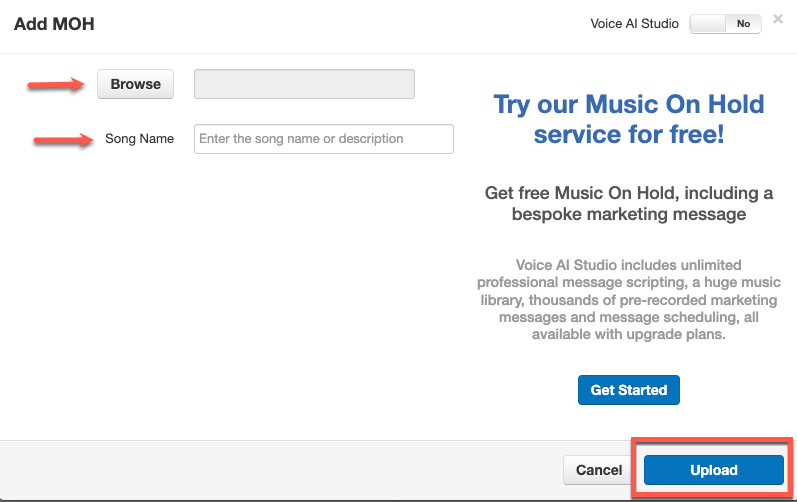
- To upload your own file instead, use the toggle in the upper right of the box to turn Voice AI Studio off, then browse to your music file.
- Enter a song name/description and select Upload. Repeat to build your hold-music library.
⚠ File format: hold music files must be in .wav format.
Adding Messages to ALL Call Queues
You can play an introductory message at the start of the call and/or periodic messages while callers wait:
- In Music On Hold, select your Domain — messages added here are inherited by all queues.
- Select Add Introduction for a message played at the start of a call (e.g. "This call may be recorded for quality control"), or Add Message for one played while callers hold.
- Create it via Text-To-Speech, Upload, or Record.
- Click Upload or Save depending on the option chosen.
- From the Messages section you can play, download, edit and delete messages. Click the clock icon to adjust how often periodic messages play.
Adding Music/Messages to SPECIFIC Call Queues
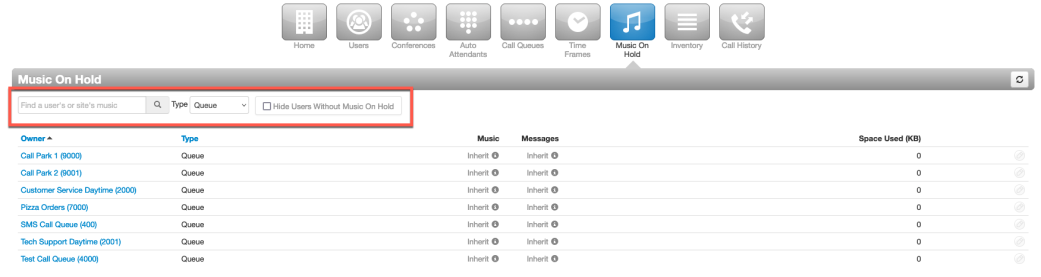
- Select Music On Hold in the Portal.
- In the "Find a user's or site's music" search box, type the extension of the call queue — or set the Type drop-down to Queue. Make sure "Hide Users Without Music On Hold" is unchecked.
- Select the queue and follow the same steps as above to add its music or messages.
ℹ For individual users: users can set personal hold music from their own portal, but most of the time hold music is set at the domain level — users should check with their Office Manager first.
Related: Voice AI Studio · Call Queues
↑ Back to top